Load XQuery module from Query Console

tool

#1

Hi all,

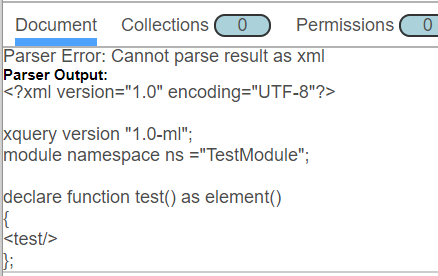
I’m trying to insert a module (XQuery) from the Query Console (ML v9.0-8) but I’m facing a XML parse exception.
My scenario :

  • Select the Module DB
  • Click on New
  • Add my code
  • Save

With

xquery version "1.0-ml";
module namespace ns ="TestModule";
declare function test() as element()
{
  xdmp:unquote("")
};

Save works well without error

But with

xquery version "1.0-ml";
module namespace ns ="TestModule";
declare function test() as element()
{
  <test></test>
};

I get

2019-02-02_2057

What have I done wrong ?
Same test with Javascript seems to be ok.

Any suggestion welcome :slightly_smiling_face:

Thanks in advance


#2

Hi @johan. That looks like a bug to me. It seems that it creates an XML document as soon as there is something that looks like an XML tag (which happens sometimes, you know, in XQuery.) And it seems like it is not possible to decide explicitly the type of the document.

So I don’t think there is a workaround here, using only the QConsole creation mechanism. I see two solutions.

Manual creation

You can evaluate something like the following manually:

xdmp:document-insert(
   '/some/stuff/todo.xqy',
   text { 'xquery version "3.1";

declare module namespace ns = "...' })

This will give you a document with the right type: text. Make sure you pass everything every time (permissions, metadata, collections, etc.) as it overrides everything attached to the document, each time, not only the content.

ML Console

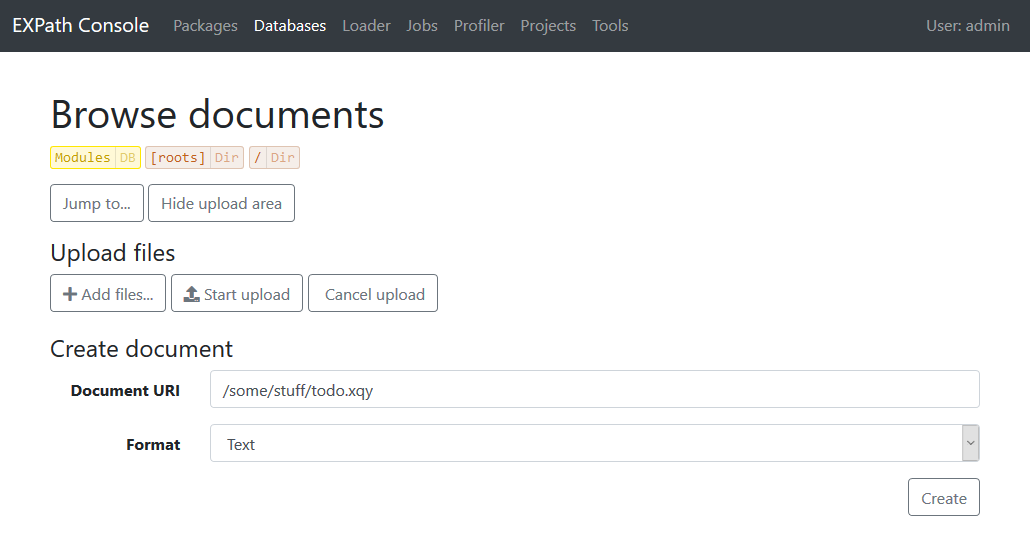
Alternatively, you can use the ML Console. Select your database, navigate through the directories, and create your document. You can select the right type at creation:

Note that it also gives you the ability to edit any document in place (as well as its permissions, metadata, collections, etc.), and also provides auto-completion for MarkLogic functions for JavaScript and XQuery files:
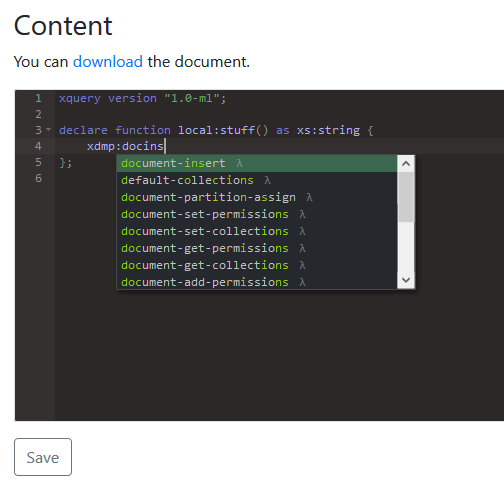

mlc-complete


#3

Thanks @fgeorges for your answer.

In fact I knew other solutions you suggest but I found that interesting by Query console.
Hope that will be fixed.

nb : as I know you, I guess you prefer the first workaround -manual creation- all in “console mode” :yum:


#4

Maybe you don’t know me that well then :wink:


#5

Indeed, it seems that the < is a problem.

If you use an entity &lt; instead of <, it will save:

xquery version "1.0-ml"; 
module namespace ns ="TestModule"; 
declare function test() as element() { 
  &lt;test>&lt;/test>
};

However, if you then attempt to explore the Modules database, click on the module, and attempt to edit and re-save (without replacing the < with the &lt; entity) then you will get the same error.

It appears that the Query Console edit/save uses xdmp:unquote() with the option “repair-full”, which doesn’t work in all cases for XQuery modules, or even a text file that has an < character.

If you attempt to create (or edit) a text document “test.txt” with the content: 1 < 2 and save, it results in the following error:

Unable to save the file.
XDMP-DOCSTARTTAGCHAR: xdmp:unquote(“1 < 2”, “”, “repair-full”) – Unexpected character “2” in start tag at line 1